Two devices, two days
Think of one ordinary day:
- You walk to the kitchen with the iPhone on the table. Only the Watch counts.
- You take the Watch off to charge it and go to the shop. Only the iPhone counts.
- You go for a walk with both. Both count the same walk, and they seldom agree to the step.
At the end of the day the iPhone has its number and the Watch has its number. Each is right about what that device noticed. Each has gaps.
Which number is right?
The combined one. The Health app on your iPhone collects the steps of both devices and shows one total under Browse, Activity, Steps. Where both devices recorded the same part of the day, Health does not add them together. It keeps one source, following a priority order. The source at the top of the list takes priority.
That is why the two device numbers always add up to more than the day’s total. They overlap.
How the two are combined: an example day
Look at the stroller walk. The wrist hardly swings when your hands hold a stroller, a trolley or a cup of coffee, so the Watch counts little. The iPhone in your pocket counts the walk. Which of the two ends up in your total depends on the method.
What Stridune does
Stridune reads both devices from Apple Health and gives you the choice between two counting methods:
The default
Apple Health total
Exactly the number the Health app shows. Health keeps one device for each stretch, by its priority order.
For Apple Watch wearers
Optimized merging
For each short stretch of the day, the device that counted more. A step is never counted twice, and the result is never below the Health total.
The two counting methods explained
Whichever you choose, every day has a section called “Where the count comes from”. It lists each device, the hour-by-hour pattern and when the data was last read, so you can see how the number was made.
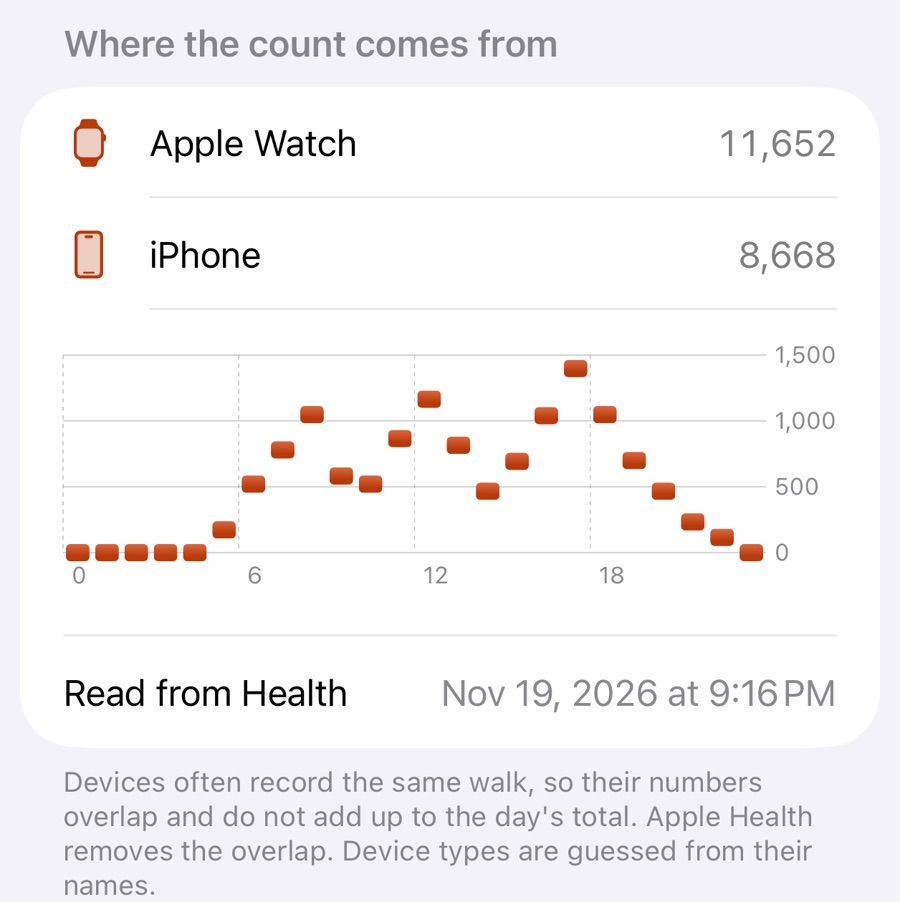
Which device shows more, and why
- Watch higher than iPhone
- You wear the Watch all day, and the phone stays on the desk, the sofa or the charger for hours.
- iPhone higher than Watch
- You pushed a stroller or a trolley, carried bags, or took the Watch off to charge it.
- Both nearly the same
- You carried both all day. They still differ by a few steps, because each has its own sensor in its own place.
- Total lower than you expect
- The total is not the sum. The steps both devices saw are counted once.
If the difference is large
- A few hundred steps between the devices is normal.
- If a whole walk is missing from the total, the Watch has not passed its data to the iPhone yet. What to check when Apple Watch steps do not sync.
- If the total looks too high, look for steps entered by hand or written by another app. How to see the sources for Steps.
Sources, read on 19 November 2026: Apple Support, “Manage Health data on your iPhone, iPad or Apple Watch”, support.apple.com/en-us/108779. The numbers in the diagram are an example. What Stridune does is described in its own help texts.