Why it looks like double counting
Open the Health app, go to Steps and look at the data per source. An example: 8,400 from the Watch and 6,900 from the iPhone on a day with a total of 9,100. It looks as if something is wrong. It is not: most of those steps are the same steps, seen by two devices. The total counts them once.
How Apple Health decides
Health keeps an ordered list of sources for each kind of data. When several sources supply the same kind of data, the source at the top of the list takes priority. The default order is:
- Health data that you enter by hand
- Data from your iPhone, iPad and Apple Watch
- Data from apps and Bluetooth devices
You can see and change this order for Steps.
When a total really can be too high
- Steps typed in by hand. Manual entries are first in Apple’s default order.
- Another app that writes steps into Apple Health. Some apps and devices add their own step records. Check the list of sources.
Stridune is not one of them. It reads steps and never writes to Apple Health, and no feature adds steps. If a day contains steps that were not walking, you can remove them inside Stridune. Apple Health keeps the original, and you can undo it.
How Stridune avoids it
Stridune takes its history from Apple Health, so it starts from a total without doubles. It has two counting methods, and neither adds the two devices together:
- Apple Health total: the Health app’s own number.
- Optimized merging: for each short stretch of the day, the one device that counted more.
Every day page shows the devices next to the day’s total, and says that they overlap:
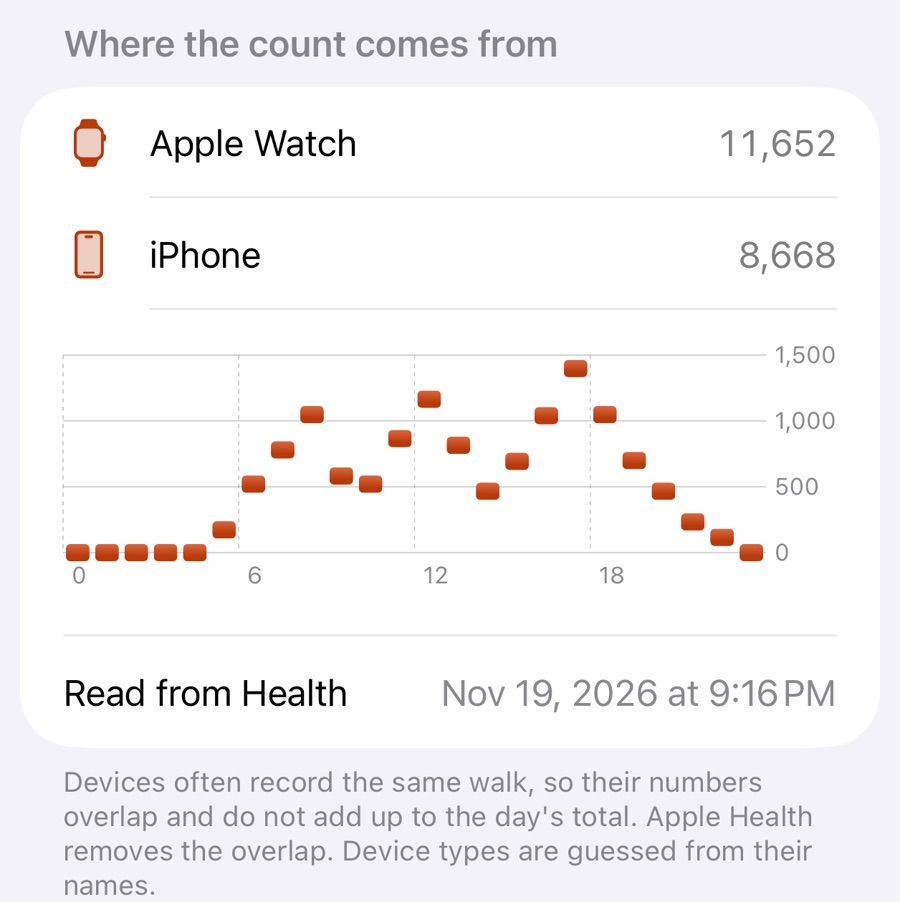
In this sample day the Watch recorded 11,652 steps and the iPhone 8,668. Together that would be 20,320. The day’s count is 14,210, because most of those steps were the same steps.
A quick check you can do yourself
- Take a short walk with both devices, about 500 steps, and count along roughly.
- Wait 20 minutes, so that both devices have passed on their data.
- Open the Health app, Browse, Activity, Steps, and look at the hour of your walk.
You will see about 500 for that hour, not about 1,000.
Source, read on 19 November 2026: Apple Support, “Manage Health data on your iPhone, iPad or Apple Watch”, support.apple.com/en-us/108779. The numbers in the text are an example.