Why there is a choice at all
If you only carry an iPhone, there is nothing to choose: both methods give the iPhone’s count. The choice matters when two devices count, because they rarely see the same day. The Watch is on your wrist, the iPhone is in a pocket, in a bag or on the table.
The default
Apple Health total
Exactly the number the Health app shows. When iPhone and Watch both recorded the same minutes, Health keeps one device, following its priority order.
Good: the same number as the Health app.
The catch: steps that only the other device counted in those minutes are dropped.
For Apple Watch wearers
Optimized merging
For each short stretch of the day, Stridune uses the device that counted more. Each stretch uses one device only.
Good: steps one device missed are kept. The result is never below the Apple Health total.
The catch: the number can be a little higher than in the Health app.
One example day
- At home, phone on the table. Only the Watch counts: 600. Both methods use it.
- A walk with a stroller, phone in the pocket. Your hands hold the stroller, so the wrist hardly swings and the Watch counts 300. The iPhone counts 2,400. Apple Health keeps the Watch, because it comes first in its order, and 2,100 steps are lost. Optimized merging takes the iPhone.
- Watch on the charger, a trip to the shop. Only the iPhone counts: 900. Both methods use it.
- A normal walk with both. Watch 3,100, iPhone 3,050. One device is used, never the sum.
The numbers are an example to show the principle. The two methods differ when one device missed steps that the other counted.
Which should you choose?
- iPhone only: it makes no difference.
- You want Stridune to match the Health app to the step: Apple Health total.
- You often push a stroller or a trolley, carry things, or take the Watch off: optimized merging.
- You compare with another app that merges devices: optimized merging usually lands close to it. A difference of about one percent between such apps is normal.
What stays the same with both
- Stridune only reads Apple Health and never writes to it.
- No step is counted twice, and no feature adds steps.
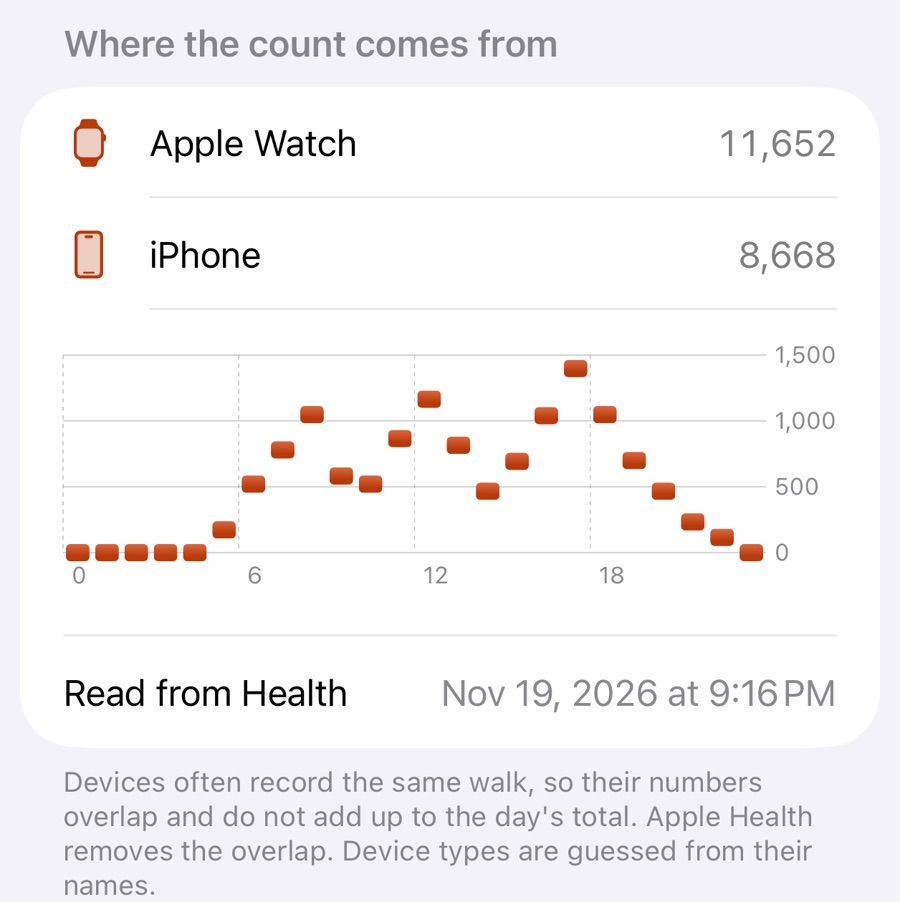
- Every day shows where its count comes from: each device, hour by hour.
- Past days stay as they were. Past days never change.
How to switch
Open Settings, then “Data, backup and export”, then Counting. You see a preview before anything changes, and you can switch back. A change applies from today.